

XBox 360 Controller PRO is a plugin for using an XBox 360 controller (or a compatible knockoff) as a jogging pendant for UCCNC. It takes the free XBox 360 Plugin for UCCNC and adds a substantial set of extra features for a more capable, customizable pendant experience.
NEW v3.100 – 10/11/2026! Button mapping overlay, a new status bar, a controller-driven setup menu, and nothing extra to install.
Features:
What the Pro version adds over the free version:
- Proportional stick jogging – both analog sticks jog any axes, with deadbands, linear / squared / cubed response, and two switchable sets of maximum velocities (fast jogging across the table, then a very low max speed for setup work, center finding, etc.)
- Assignable buttons – every button can run any UCCNC button function on press, on release, and on a long press (e.g. e-stop with a quick touch, but reset requires a hold of a user-settable duration so a bump can’t trigger it)
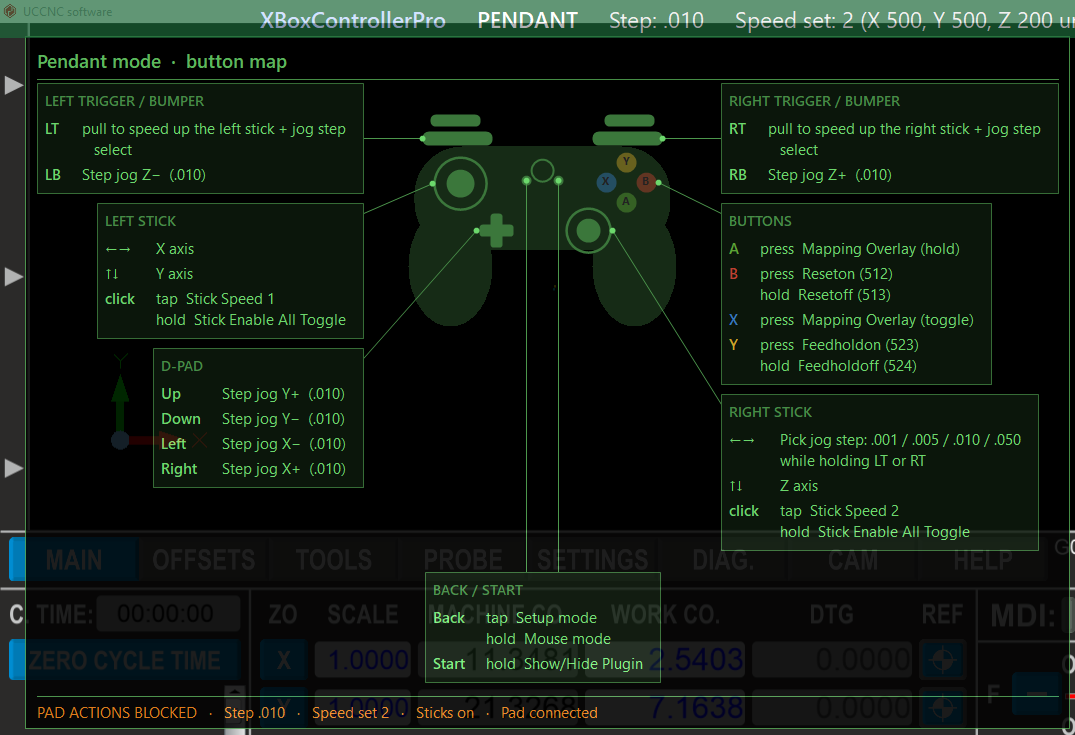
- Step jogging – D-pad and shoulder buttons step-jog any axis; the right stick can select the jog step size
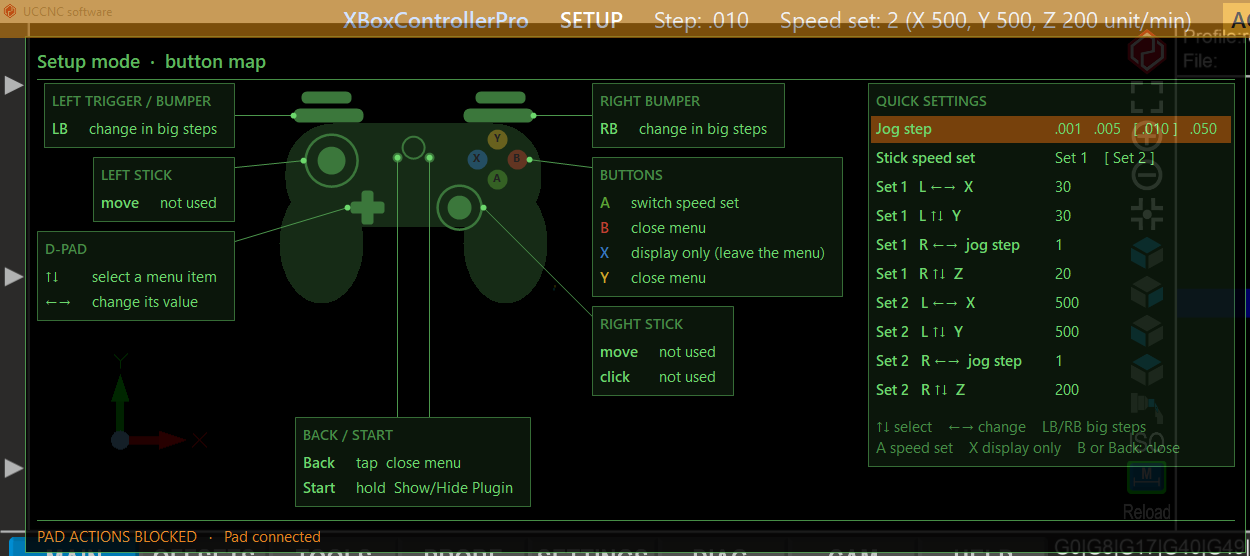
- Three modes, switched with the Back button: pendant, a controller-driven setup menu (jog step, stick speed set, stick max velocities), and mouse mode (pointer, scroll and keys – yes, the XBox controller can also be your mouse)
- Button mapping overlay (new in 3.100) – a see-through panel, shown from the controller, that lists (or draws on a controller diagram) what every stick and button does right now. It lights up what you press, shows a red E-STOP / RESET indicator, and can block the controller while it is up
- Status bar (new in 3.100) – a thin bar on any screen edge showing the mode, jog step, speed set with each axis’s top speed, sticks, pad connection and E-STOP / RESET, plus a long-press timer that names the function you are about to run
- Per-profile settings with safe saves, rotating backups, and saved defaults. First-time installs ask whether you work in inch or metric and load sensible defaults to get you jogging quickly
- Access to the thumb stick button clicks and start button (back button reserved for mode changing in the plugin)
- Select-able polling rate (25, 50 or 100 Hz), an online check for newer versions, and a built-in User Manual
See it in action:

Download here:
XBox 360 Controller PRO User Manual (online)
Purchase here:
XBox 360 Controller PRO is $10.00 USD. It runs as a free 45-day demo to test it out and see if it is for you. After that a purchased license key is required to continue using it. License does not expire, and entitles you to new updated versions of the plugin as they are made available.
All license sales are final. Because license codes are delivered instantly as digital goods, they are non-refundable, so please make sure you test and that the plugin suits your setup before buying.
Looking for the free version instead? See the XBox 360 Plugin for UCCNC (free, no Pro features).
Requirements
Works with UCCNC, for both x86 and x64 computers. Nothing else needs to be installed – as of v3.100 the plugin reads the controller directly through Windows’ own XInput, so the SlimDX and DirectX runtimes are no longer needed. (Upgrading? An existing SlimDX install can be left alone or removed, and your existing settings are read automatically.)
| NOTE: If the status bar says ‘Gamepad found, not in XInput mode’, or the controller isn’t detected, your pad is probably a third-party controller in its DirectInput mode. Switch it to XInput mode (an X / D switch – set it to X – or hold Home with X, A or Start for a few seconds), then unplug and reconnect it. In XInput mode Windows lists it as ‘Xbox 360 Controller for Windows’. Still having issues? See this troubleshooting page! |
Versions
Previous versions (click to expand)
Need an earlier release? Most people should use the current v3.100 above. Earlier versions of XBox 360 Controller PRO are kept here:
Note: v3.000 and earlier need the SlimDX 2012 SDK or runtime libraries (SDK / runtime) installed to detect the controller. v3.100 and later do not.
Version History (click to expand)
V3.100: 10/11/2026
– NEW button mapping overlay (list or controller diagram, live highlighting, E-STOP / RESET display, optional pad blocking), shown with new Mapping Overlay button functions.
– NEW setup menu: a Quick settings panel inside the overlay (jog step, stick speed set, stick max velocities), driven entirely from the controller.
– NEW status bar on any screen edge, with mode, jog step, speed set and per-axis top speeds, sticks, pad connection, E-STOP / RESET, and a long-press hold timer.
– Long press: the countdown and end-of-hold buzz only happen for buttons with a long-press function assigned, and the countdown names the function that will run.
– No extra install: the controller is read directly through Windows’ XInput (SlimDX / DirectX no longer needed). Controllers that Windows sees but XInput can’t (DirectInput mode) are now reported as ‘not in XInput mode’.
– New Polling rate option (25 / 50 / 100 Hz). Fixed the control loop being held to 11-22 Hz when the right stick was set to JogStep.
– Settings now stored per profile in plugins\XBoxControllerPro\Settings\ with safe saves, rotating backups and a load log; new Restore backup, Save as defaults and Load defaults buttons. Settings from v3.000 and earlier are still read.
– First run asks for inch or metric and loads matching defaults.
– Button-function pulldowns now list UCCNC functions by name, followed by your profile’s macros.
– Overlays, the long-press countdown and info messages no longer take keyboard focus from UCCNC.
– New online version check and a Help tab that opens the User Manual (HTML).
– Tooltips on all settings, info messages that shrink to fit the screen, and message boxes that open in front of UCCNC.
– Fixes: Y axis creeping while picking a jog step; reversed C axis using the Z axis max velocity; overlapping control loop passes causing duplicate jog commands; stray stop command on D-pad / shoulder release with no axis assigned; buttons pressed outside pendant mode firing a release function later.
– Removed the taskbar-icon pop-up notifications (the tray icon remains).
V3.000: 6/18/24
Initial release of XBox 360 Controller PRO.