UCamCopy is a vision based probing and ‘line following’ plugin for UCCNC. It provides the 2D perimeter tracing ability of ProbeIt, but with a camera instead of a touch probe :). The plugin requires a webcam, preferably a ‘microscope’ based camera with fairly high magnification. Preferred image resolution from the camera is 640×480 with a rate of 30 fps, making cheap cameras ideal. The image captured from the webcam is processed using EMGU/OpenCV to perform edge/line detection. Once an edge is found, the image data is used to drive the CNC machine around along the edge, and record the data to a DXF file for use in reconstructing or copying geometry.
Current version: v2.400 (UCCNC 1.2116 and later). For UCCNC 1.2115 and earlier: v2.203, the final release for those versions.
Features:
- Camera based edge/line detection and automatic edge following, recording the traced path to DXF (and CSV)
- Video probe circles and arcs: 3 point and multiple point with least squares fit to find centers/diameters
- Locate line ‘intersections’ as a target point; set G68 rotations
- Improved line detection by merging similar lines into a ‘best fit’
- Manual point recording and creating lines/perimeters in the DXF, as well as auto tracing
- Multiple views to help adjust the image (original blurred image, canny detections, threshold and composite images shown simultaneously)
- 3D/DXF viewer shared with ProbeIt for UCCNC, with layer and color control; DXF files optimized for VCarve and Lightburn
- Jogging and ‘move to’ controls built in, plus help / setup guides
New in v2.400 (click to expand)
The viewer code is shared with ProbeIt for UCCNC, so ProbeIt v2.400 gets the same viewer features.
Main new features
- DXF viewer editing: click or hover to pick lines, circles, arcs and polylines; box select; delete with undo/redo; draw lines with snapping to existing endpoints; move entities to another layer; right-click menu; and Save As.
- One-click Auto Tune for the video image (with Undo), plus a simpler Image Detection window with Simple and Advanced views.
- Camera handling: your last camera is remembered and starts automatically, and CPU use is lower.
- Recording creates or selects the DXF layer for you.
- Cleaner interface: sliding, resizable panels that remember their state, settings in their own windows, adjustable point markers and colors, and a flashing E-Stop indicator.
- Windows installer and an HTML user manual that replaces the PDF.
Reliability and safety
- Safer settings: atomic saves, rotating backups, ‘Restore from backup’, and a damaged settings file is never overwritten. Inch or metric defaults are chosen on first run.
- Machine moves can be aborted and fail safe.
- Fixes: DRO zero/set on UCCNC 2.2116+, dropped samples in edge-trace recording, G68 and arc rotation angles, the PID integral term, line merging, DXF files with repeated layer names, and several crashes and freezes.
Upgrading: to record edge-trace points into the DXF, the ‘Record DXF’ checkbox must be checked. Older settings are imported automatically on first run. See the Version History at the bottom of this page for the complete list.
See it in action:
Initial setup and PID calibration:
Adjusting video parameters and starting edge tracing:
Other video demonstrations of the plugin can be found here.
Download here:
| For UCCNC 1.2115 and earlier | For UCCNC 1.2116 and later |
Going forward, UCamCopy supports UCCNC 1.2116 and later. If you are on UCCNC 1.2115 or earlier, v2.203 is the last version for you. Updating UCCNC lets you use the current UCamCopy.
Purchase here:
UCamCopy is $30 for a license key. It is a fully functional demo that is free to use for 20 days to verify its functionality and to see if it works for your needs. The license is tied to your UC hardware serial number, but is otherwise able to be used on as many computers and machines as you wish, both for commercial and personal use.
All license sales are final. Because license codes are delivered instantly as digital goods, they are non-refundable, so please try the free demo first to make sure it suits your setup.
Want both plugins? The ProbeIt + UCamCopy combo license is $50 and gives you both license codes from one SN_Lic.
Requirements
* UCCNC 1.2116 or later for the current version (v2.400). If you are on UCCNC 1.2115 or earlier, v2.203 is the last version for you and it will not receive further updates, but you can update UCCNC at any time to use the current UCamCopy. UCCNC must be fully licensed and linked to a CNCDrive controller (i.e., UC100, UC300, UC400, AXBB, etc.). UCamCopy has been tested on Windows 7 x86 and Windows 10 x64 using both a UC100 and UC300.
* You need to have a camera, preferably a ‘microscope’ camera with the ability to focus up very close and create a zoomed in image. The camera needs to be able to provide an image of 640×480, and 30 fps. It is not recommended to seek a camera with more resolution, as the frame-rate drops significantly with large images due to the amount of processing required to detect lines/edges/contours.
* A little patience 🙂 UCamCopy requires a fair bit of user input and setup, with adjusting image lighting, focus, and detector parameters. Give it a little time to become familiar with what works, and what doesn’t. Please contact me to let me know of issues found, or to propose enhancements.
Camera Recommendations
Some recommendations on cameras: I’ve only tested a few cameras, so I don’t feel I can give any specific recommendation for a ‘brand’, or a ‘make’ or ‘model’ that is superior. However, I’ve tried a few types of cameras, and have formed a few opinions on what I like and did not like.
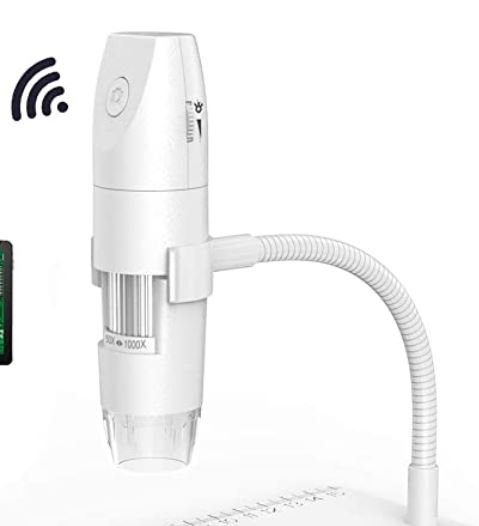
First, I DO NOT like cameras which put the focus mechanism near the lens. My experience with this type was that the lens focus adjustment mechanism had ‘slop’, and that resulted in an image that bounced around a lot because the lens was physically moving/vibrating in the camera. Maybe it was just this particular make/model, but I don’t recommend this type or model:
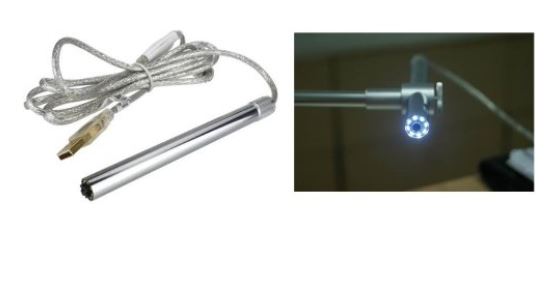
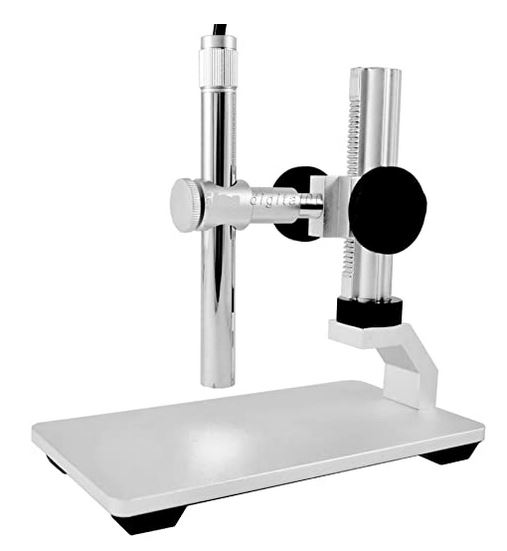
The camera I’m personally using is this kind, with the focus mechanism located at the back near the cable exit. This camera works well for a decent price. By linking to this, I’m not suggesting this is the best or greatest camera, it’s merely one I’ve tried and use myself.
If you have any comments, issues, or feature requests, please contact me.
Versions
Previous versions (click to expand)
Need an earlier release? Most people should use the current versions above. Earlier releases are kept here:
For UCCNC 1.2116 and later:
For UCCNC 1.2115 and earlier:
Version History (click to expand)
V2.400: 10/11/2026
For UCCNC versions 2.2116 and later (replaces V2.301). A broad round of stability fixes, viewer features and user interface clean-up. The DXF viewer code is shared with ProbeIt for UCCNC, which gets the same viewer features. The online manual replaces the PDF.
Please note when upgrading:
– New viewer settings (panel widths, point-marker size/colors) are added automatically with defaults. Settings saved by older versions still load.
– To get edge-trace / recorded points into the DXF, the ‘Record DXF’ checkbox must be checked. The new ‘Save As’ in the viewer writes the DXF whether or not that box is checked.
New: DXF viewer
– Click an entity to highlight it and show its info; hovering highlights the entity under the cursor. Lines, circles, arcs and polylines (open and closed) can be picked. Open shapes show Start (green), End (red) and, for arcs, Center (blue) dots.
– Delete selected entities, with Undo and Redo (Ctrl+Z, Ctrl+Y or Ctrl+Shift+Z). Undo/Redo covers deletes, drawn lines and layer moves.
– Box Select tool (Ctrl or Shift adds to the selection, Alt removes) and a Zoom Box tool.
– Draw Line tool: click a start and an end point to add a line to the DXF. The cursor snaps to existing line endpoints, and lines chain from the last end point. New lines go on the active layer.
– Move to Layer: move the selected entities to any other layer (undoable).
– Right-click menu: Delete, Move to layer, Draw Line, New Layer, Undo, Redo, Clear selection, Zoom to fit, Save As. Right-drag still rotates the view.
– Save As: save the DXF data to a new file, which becomes the current file.
– Round point markers, smaller by default (6 px) and always the same size on screen at any zoom. Marker size and the Start / End / Arc center / Snap colors are adjustable, and the old ‘General Settings’ tab is now a separate Viewer Settings window. Selection color, hover color, probe-tip color and grid line width are also user settings.
– The DRO and Layers/File Info panels slide in and out, can be resized, and remember their state and width. The DXF info box now sits in the Layers panel, and the status bar is full width along the bottom.
– Viewer window restyled to match the main window; its EStop button flashes while E-Stop is active. The ‘View Window Options’ menu was removed and keyboard tab order was fixed.
New: video / edge detection
– One-click Auto Tune for the video pipeline, with an Undo button.
– The Detect tab is now the Image Detection window (Settings menu), with a Simple / Advanced view. The HSV sliders are hidden unless HSV is on.
– The last camera used is remembered and re-selected at startup, and starts automatically when found (no ‘Camera started’ popup).
– Lower CPU use: HSV conversion, blur and in-range work is skipped unless HSV mode (or an HSV view) is active, and per-frame buffers are reused.
– Starting a recording creates or selects the DXF layer itself instead of asking you to.
New: settings, defaults and backups
– Safe settings storage: files are written atomically, the newest 10 backups of each settings file are kept, a settings file that cannot be read is never overwritten, and a load log records every save, load and anything that could not be applied.
– General Settings has buttons to set inch or metric defaults, save your current settings as your defaults, and restore a backup. The first run asks whether you work in inch or metric.
– Settings are now kept per plugin folder instead of per UCCNC.exe location. Older settings are imported once on the first run.
– The HTML user manual replaces the PDF, and the Help button opens it. There is now a Windows installer (UCamCopy-2.400-Setup.exe).
New: main window
– Sliding Hide/Show bars for the left camera panel and the right panel, so the video area gets the spare height. The E-Stop button flashes while active.
– Consistent look: flat buttons with one hover/pressed color, one font family, Title Case labels and a more compact two-row DXF button bar.
– The settings tabs under the video are gone. Settings are in separate windows opened from the new Settings menu (Image Detection, Offset & Velocity, General Settings). The windows snap to each other and remember their positions. General Settings is in collapsible groups.
– Every message and input box now appears on top and is titled ‘UCamCopy: …’. Open tool windows are reused instead of duplicated, and viewer errors and invalid axis input are reported.
– Machine moves are abortable and fail safe.
Fixes
– DRO zero/set did not work on UCCNC 2.2116+; now fixed.
– Edge-trace recording: samples were dropped (every other point could be skipped, and a stuck ‘Break’ could stop recording entirely). Fixed, and recording failures are now reported in the UCCNC status line.
– Viewer: a NullReference when the viewer painted before it was shown caused the grid and DXF to fail to draw. Fixed. The grid also failed to draw on some graphics drivers; worked around.
– Layer names in the viewer must now be unique. Renaming a layer to a name already in use used to create two layers with the same name, and a DXF saved that way could not be opened again. Save and Save As now refuse to write a DXF with repeated layer names, and such a file saved by an earlier build now opens, with the repeated layer entries ignored.
– Right-clicking replaced a multi-selection with a single entity. Open polylines were drawn and hit-tested as closed shapes. Layer entity counts could silently show 0. All fixed.
– G68 / arc rotation angles always computed to zero. Fixed.
– The PID integral term never accumulated across ticks. Fixed.
– Line merging now compares undirected angle, gap and the Colinearity setting, and no longer fuses parallel edges. Corner-line selection picks the longest line genuinely at an angle to the longest.
– Crashes fixed: AccessViolation when the camera was started or in the image box paint, a crash of UCCNC at shutdown, an HSV picker crash, Shift-click HSV picker double-converting the color, and a lost double-click angle. Camera start/stop races and per-frame error popups were fixed, as were cross-thread control access during video processing and a one-second freeze on every Start Camera click.
Under the hood
– Large forms were split into files by feature, and dead code and unused resources were removed. The viewer’s pick/select/undo logic, point markers and drawing helpers now live in the shared CraftySharedViewer library used by ProbeIt for UCCNC.
V2.203 & V2.301: 2/29/24
UCamCopy V 2.203 is for UCCNC versions 2.2115 and prior
UCamCopy V 2.301 is for UCCNC versions 2.2116 and later
Only a minor form bug fix was made to V2.301 (the license text box on the About tab was hidden). No other functional changes, and no equivalent change was made to V2.203.
V2.203 & V2.300: 12/29/23
UCamCopy V 2.203 is for UCCNC versions 2.2115 and prior
UCamCopy V 2.300 is for UCCNC versions 2.2116 and later
UCamCopy V 2.203 and V2.300 are functionally equivalent and share the same updates and features, with the only difference being which version of UCCNC they will run with. If you have the wrong version of UCamCopy installed for your version of UCCNC, UCamCopy will not run, and will not be found in the list of plugins to be enabled.
### NOTE: This is a dual release to support versions of UCCNC at 2.2116 and later, as well as versions of UCCNC 2.2115 and prior. Changes in UCCNC versions 2.2116 relative to the version of OpenTK (graphics) made UCamCopy incompatible unless the newer version of OpenTK (3.3.2) was referenced. Going forwards, versions of UCamCopy in the version 2.2xx range will be for UCCNC 2.2115 and prior, and versions of UCamCopy greater than 2.3xx will be for UCCNC 2.2116 and later. Dual support may be ended at a later time, to focus efforts on a single version for the most up to date UCCNC versions.
Updates and new features:
– Updated viewer to match ProbeIt’s pan/zoom/rotate functionality
– Added snap to view functionality to DXF viewer
– No additional updates to functionality over v2.201
V2.201: 6/1/23
– Installer fixed, was missing ‘magnetwindows.dll’ file, causing issues for some users that did not have the file from a prior installation or from ProbeIt. No change to program otherwise.
V2.200: 4/30/23
– Significant re-write and re-format of program to make user interface similar to ProbeIt for UCCNC
– Video probe circles and arcs, 3 point and multiple point with least squares fit to find centers/diameters
– Set G68 rotations
– Added help / setup guides
– Improved line detecting by merging similar lines to a ‘best fit’
– Able to locate line ‘intersections’ as a target point
– Improved DXF manual point recording and creating lines/perimeters manually as well as auto tracing
– Added jogging and ‘move to’ controls to interface
– Added multiple views to help adjust images (able to view original blurred image, canny detections, threshold, and composite images simultaneously)
V2.000: 1/10/21
– New Viewer based upon OpenTK, used to view DXF data
– Control of Layers and colors in DXF. Create/rename/delete & change colors
– NetDXF.dll no longer required (library modified and built into the plugin)
– DXF files optimized for use w/ VCarve or Lightburn. Opens files exported from those programs, and saves files they open
– Many ‘under the hood’ fixes, resulting in lower CPU usage, bug fixes, etc
– Can set a custom ‘button code’ number to open the plugin via hotkey or user button
V1.011: 9/6/2020
– Bug fixes, most have to do with 3D viewer
– Viewer closes automatically when plug-in closes
V1.010: 4/10/2020
– Now provided in a self-extracting zip.exe file. Just point it to install in the UCCNC directory!
– Added 3D viewer (shared w/ ProbeIt for UCCNC), displays geometry recorded and camera position in real time
– Tweaked/fixed the PID calculations. Had issue that the X and Y PIDs would both saturate at 100% when traversing along path that was near 45 degrees diagonal
– Mask can be made longer than 100 pixels
– Added a ‘DROs’ Tab, which allows selection of work coordinate and zeroing of axis
– Added ability to open existing DXFs, you can then record and append data to DXF that is opened
– Added ‘CSV’ perimeter recording, save out a comma separated value file of the perimeter recorded along w/ DXF
– Some interface ‘cleanup’ and button adjustments
– Added some ‘default’ xml files, you can select inch or metric on load. After using the defaults, be sure to hit ‘save settings’ to save your XML settings
V1.001: 12/30/2019
– Fixed velocity numeric input boxes (was limited to maximum of 10.0)
– Added ‘Shift-click’ to select HSV color from the image and pre-set the ‘V’ slider bar
– Added tool-tips with enable/disable on a new ‘settings’ tab
– Removed ‘auto save settings’ during close of plugin, seemed to be causing settings to be over-written by null data if UCCNC was closed first. Settings will now only be saved when user clicks ‘save settings’ button
V1.000: 12/26/2019
Initial Demo Release.