
INSTALLATION TROUBLE SHOOTING NOTES (XBox 360 Controller PRO v3.100 and up):
1) If you cannot find the plugin to enable it in UCCNC ‘configure plugins’, the XBoxcontrollerPro.dll file is in the wrong location. It belongs in the [UCCNC\plugins] folder.
2) If the plugin is found in the plugin configure window and loads once enabled, but you see ‘loop error’ in the status bar and no response from the controller, check the following:
- Check that Windows can see the controller (plug it in and look in ‘Set up USB game controllers’).
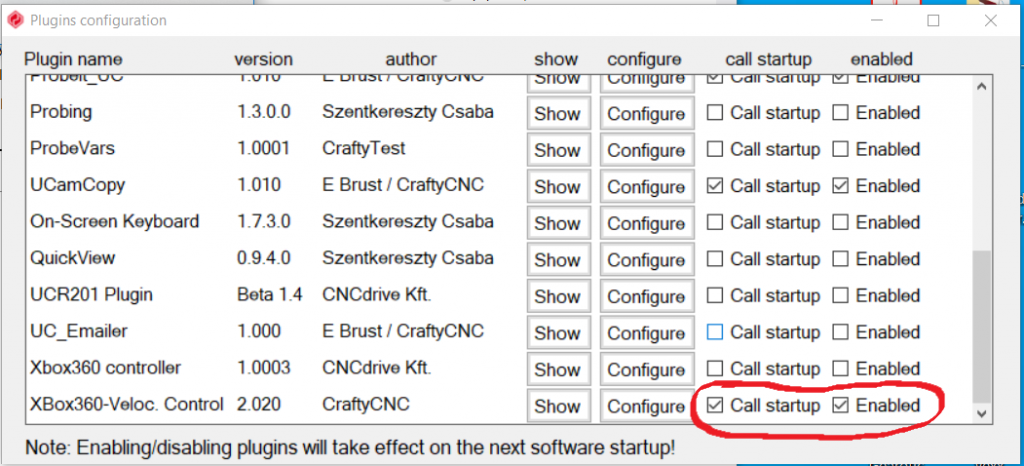
- Ensure that you are selecting both checkboxes ‘enable’ and ‘call startup’ in the UCCNC plugin configure window. The XBox plugin MUST load with UCCNC; you cannot use the ‘show’ button to load the plugin after UCCNC is loaded. Close and re-open UCCNC so they load together.
3) If the status bar says ‘Gamepad found, not in XInput mode’ (or the controller is not detected): the plugin reads the controller through XInput, which only sees genuine XBox 360 / XBox One controllers and clones that identify as one. Many third-party pads have a second DirectInput mode in which Windows lists them as a generic ‘Gamepad’; XInput cannot see them in that mode. Switch the pad to XInput mode (an X / D switch – set it to X – or hold Home with X, A or Start for a few seconds; see the pad’s instructions), then unplug and reconnect it. In XInput mode Windows lists it as ‘Xbox 360 Controller for Windows’.
4) If a settings file is ever damaged, the plugin offers to restore the newest backup. The Misc Settings tab also has buttons to restore from a backup, save the current settings as your defaults, and load your defaults.
Using an older version (v3.000 or earlier)?
Older versions need the SlimDX runtime (and DirectX components) installed. If the plugin is missing from ‘configure plugins’, or shows ‘loop error’ with no controller response, please install the SlimDX SDK (or the x64 / x86 runtime installers from the zip), reboot and try again. Version 3.100 and up no longer need SlimDX, so the simplest fix is to update to the latest version.